MstGrid
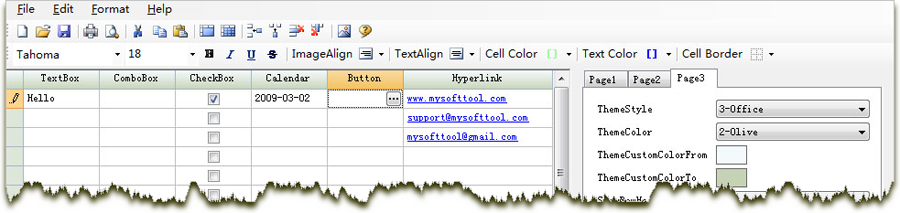
MstGrid is a professional and easy-to-use grid control, it
provides comprehensive functions for
creating user-friendly
interfaces that display, edit, format, organize, and print tabular
data. It can help accelerate your application development process.
MstGrid for ActiveX supports standard Microsoft Windows ActiveX interface, it can be used with Visual Basic, Visual C++, Visual FoxPro, MS-Excel, MS-Access, etc.
Current Version: 3.8.0, File Size: 2.2M, Latest Updates: April 01, 2013
MstGrid for .NET is a WinForm grid control, it can be used with Visual Basic .Net, Visual C# .Net and Visual C++ .Net.
Current Version: 2.13.3.29, File Size: 0.6M, Latest Updates: April 01, 2013
Main Features
Built-in Visual Styles
MstGrid Supports Windows themes and visual styles that mimic the styles available in Office including Blue, Silver, and Olive.
Comprehensive Functions
- Abibity to change each individual cell's format and styles
- Each grid cell can display images in addition to data
- Any number of fixed / frozen rows and columns
- Auto row or column sizing when dividers are double-clicked
- Move rows or columns,resize rows or columns,hide a row or column
- Create alternating rows
- Allow noncontinuous selection
- Import and export capabilities
- Owner draw mode
- Sort one or multiple columns according to any criteria
- Word-wrap and ellipsis
- Cell Merging - Similar to MS-Excel
- Well-designed Object model - Microsoft Excel-like Behavior
- Multilanguage Support
Instant Reports
MstGrid provides comprehensive print and print preview support including 45 print setup related properties. With only a single line of code, developers can show MstGrid built-in, user-friendly "Page Setup" and "Print" dialogs, allowing end-users to configure the printed appearance of all report elements, determine which data fields or pages to print, place images and text in page headers and/or footers,with macros for page number, report title, and a variety of date and time formats.
Enhanced Cell Editing
Use simple text editing, drop-down lists, date-time pickers, check boxes, cell buttons, masks, and advanced data validation to control the editing process. For example, you can use an input mask to provide a template that automatically validates data as your users type, or choose to prevent users from editing specific columns altogether.
Designer Support
You can use the MstGrid Designer to design your control and to create a prototype quickly. Use MstGrid Designer to reduce development time by allowing you to customize the look and feel of the control at design time using an intuitive, easy-to-use interface. And then at run time, load the XML file into the grid using the OpenFile methods. This provides a nice way to set up a grid without writing a lot of code..